Attack and Feed Button: Difference between revisions
Create standalone guide from audited umbrella content |
Clarify player instructions: Attack and Feed Button |
||
| Line 7: | Line 7: | ||
The four examples show the species-specific versions of the same main HUD control | The four examples show the species-specific versions of the same main HUD control. | ||
# Face the target and move within 1.5 metres. | |||
# Click your main button. Select the intended target if a list appears, then choose your action. | |||
# Watch the HUD’s combat text for the result. Click the main button again to stop. | |||
For player combat, choose a damaging attack. Hunters’ '''Protection''' and Witches’ '''Resurrection''' are human abilities, not damaging attacks. Both avatars may play combat animations when their personal animation setting is enabled. See [[Combat|Combat]] for the attack guide. | |||
Near an avatar who is not a registered player, the same control starts the applicable regular-human interaction. Blood feeding, human blood states, recovery, Hunter Protection, and Witch Resurrection are covered in [[Feeding and Blood Levels]], [[Hunter Protection]], and [[Witch Resurrection]]. | Near an avatar who is not a registered player, the same control starts the applicable regular-human interaction. Blood feeding, human blood states, recovery, Hunter Protection, and Witch Resurrection are covered in [[Feeding and Blood Levels]], [[Hunter Protection]], and [[Witch Resurrection]]. | ||
Latest revision as of 18:04, 14 October 2026
-
 The vampire attack button with blood.
-
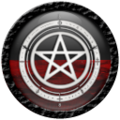 The witch attack button with blood.
-
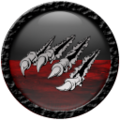 The lycan attack button with blood.
-
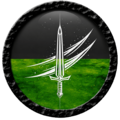 The hunter attack button with energy.


The four examples show the species-specific versions of the same main HUD control.
- Face the target and move within 1.5 metres.
- Click your main button. Select the intended target if a list appears, then choose your action.
- Watch the HUD’s combat text for the result. Click the main button again to stop.
For player combat, choose a damaging attack. Hunters’ Protection and Witches’ Resurrection are human abilities, not damaging attacks. Both avatars may play combat animations when their personal animation setting is enabled. See Combat for the attack guide.
Near an avatar who is not a registered player, the same control starts the applicable regular-human interaction. Blood feeding, human blood states, recovery, Hunter Protection, and Witch Resurrection are covered in Feeding and Blood Levels, Hunter Protection, and Witch Resurrection.
The resource graphic on the button changes with the character's current Blood or Energy level. The examples above show a partially filled resource display.
